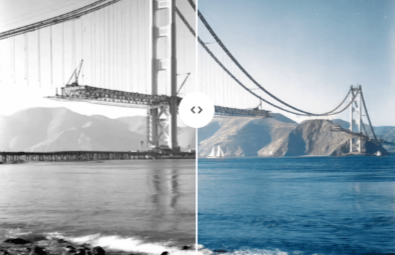
There’s something about an old black and white photograph that makes it feel distant, even when the people in it are family. Color has a way of closing that gap. A Stellar’s free online image colorizer takes those grayscale photos, whether they’re scanned family portraits, historical pictures, or old film shots, and adds realistic, natural-looking color without needing any editing skills at all.
For most of photography’s history, black and white wasn’t an artistic choice, it was the only option. That means huge parts of personal and public history exist only in grayscale. Colorization changes how those images feel. A faded photo of a grandparent as a child suddenly feels present instead of historical. A street scene from decades ago starts to look like it could have been taken last year.
The Problem With Manual Colorization
Hand-coloring black and white photos used to be a real craft, and it still is if you want full manual control. But it’s slow, it requires artistic judgment about what colors things “should” be, and it’s simply not practical for most people who just want to see an old photo in color without spending hours in Photoshop.
Digital colorization by hand isn’t much faster. You have to manually select regions, guess at skin tones, clothing colors, and backgrounds, and blend everything so it doesn’t look painted on. For a single treasured photo, that might be worth the effort. For a shoebox full of old family pictures, it isn’t.
How AI-Powered Colorization Works
An AI image colorizer approaches the problem very differently than manual editing. The model has been trained on massive datasets of color photographs, learning the typical relationships between grayscale tones and real-world colors. Skin tends to fall in a certain range. Skies are usually blue or gray. Grass and foliage are green. Wood, brick, and fabric all carry their own tonal signatures.
When you upload a black and white photo, the AI analyzes the shapes, textures, and shading in the image and predicts plausible, natural colors for each element based on everything it learned during training. It’s not tracing a template; it’s making an informed estimate for that specific photo, which is why results can vary in accuracy depending on lighting, image quality, and how unusual the scene is. Most everyday photos, portraits, family scenes, and simple landscapes tend to colorize convincingly, since these are exactly the kinds of images the underlying models have seen the most of.
Who Gets the Most Use Out of This Tool
Colorizing old photos isn’t a niche interest. It comes up in a surprising number of everyday situations:
Families digitizing old photo albums who want to see grandparents, parents, or childhood photos in a way that feels more immediate and personal.
Genealogy and family history researchers working with scanned archival photos who want a more vivid record to share with relatives.
History enthusiasts and content creators who colorize historical images for blogs, videos, or educational content, since colorized history tends to get far more engagement than the same photo in black and white.
Museums, local historians, and community archive projects looking for a quick way to make old photographs feel more accessible to a modern audience.
Anyone restoring or gifting old photos, where turning a faded grayscale print into a color version makes for a genuinely meaningful gift.
Why Free and Browser-Based Matters Here
Photo colorization used to require either specialized software or paying a professional per image, which adds up fast if you have dozens of old photos to work through. A free, browser-based colorizer removes both of those barriers. There’s no software to download, no subscription to manage, and no per-image fee. You upload a photo, the AI processes it, and you get a colorized version back that you can download immediately.
This also means it’s genuinely accessible to people who aren’t tech-savvy. Anyone can drag a scanned photo into a browser tab, without needing to know anything about layers, masks, or color grading.
Frequently Asked Questions
Is the image colorizer completely free to use? Yes. You can upload black and white photos and get them colorized without paying or signing up for an account.
How accurate are the colors the AI generates? The AI predicts realistic, plausible colors based on patterns it learned from millions of color photos, but it can’t know the exact original colors of a specific scene. For common subjects like skin tones, skies, and greenery, results are usually convincing. For unusual objects or specific colors that matter to you, some manual touch-up afterward may still be worth doing.
What kind of photos work best? Clear, well-lit black and white photos with recognizable subjects like people, landscapes, and buildings tend to colorize the most naturally. Very old, damaged, or extremely low-resolution scans can produce less consistent results.
Can I upload old scanned photos, or only digital black and white images? Both work. Scanned prints, old negatives converted to digital files, and photos taken in black and white mode on modern cameras can all be processed the same way.
Will colorizing my photo reduce its quality? No, colorization adds color information to the existing image rather than degrading resolution. If your original scan is low quality to begin with, though, that limitation carries over into the colorized version.
Is it safe to upload personal or family photos? A reliable free colorizer processes your images without storing or sharing them long-term. If you’re uploading sensitive personal photos, it’s worth checking the specific tool’s privacy policy before uploading.