Short-form content has officially become the internet’s default language.
You can spend three hours recording a podcast, webinar, coaching session, or YouTube video… but the clips people actually consume are usually under 60 seconds.
That shift has created an entirely new category of AI tools built around “content repurposing.” The promise sounds simple enough: upload a long video, let AI find the best moments, and instantly generate social-ready clips for TikTok, Reels, and Shorts.
In reality, most tools still feel unfinished.
Some generate awkward cuts. Some completely misunderstand conversational context. Others produce clips that technically work but look robotic and low-effort.
So when I tested FlexClip’s new AI Long Video to Short Video feature, I wasn’t expecting much.
Surprisingly, it turned out to be one of the more practical AI video workflows I’ve used recently.
Not because it’s perfect — it isn’t — but because it solves several real-world creator problems better than many competitors.
Here’s the full breakdown after using it across podcasts, tutorial videos, and talking-head content.
The Biggest Problem With AI Clipping Tools
Most AI clipping platforms focus heavily on automation and not enough on usability.
They market themselves like magic:
“Upload your video.” “AI does everything.” “Go viral instantly.”
But creators quickly discover the missing piece: even if the AI finds decent moments, you still need to polish the content before posting.
That’s where many tools fall apart.
You end up exporting clips into another editor anyway just to:
- fix captions
- adjust timing
- improve framing
- add branding
- change layouts
- insert overlays
- optimize for different platforms
Instead of saving time, the workflow becomes fragmented.
This is where FlexClip immediately feels different.
Rather than acting like a standalone AI generator, it behaves more like an AI assistant built directly into a full editing environment.
That distinction matters.
Starting the Workflow
The onboarding process is refreshingly straightforward.
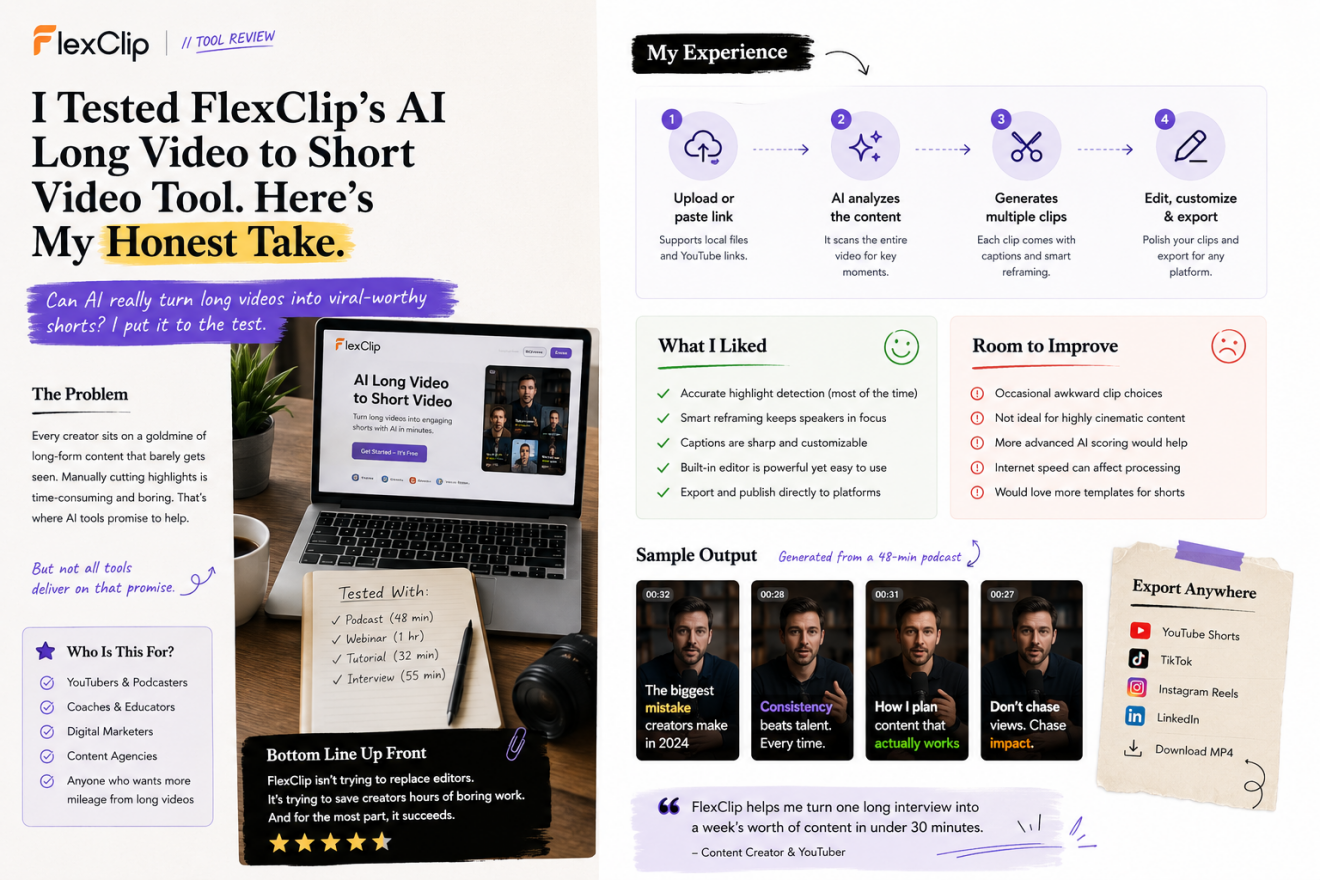
You upload a long-form video — or simply paste a YouTube link — and the system begins analyzing the content automatically.
I tested several formats:
- a 48-minute podcast interview
- a product tutorial
- a webinar replay
- a short educational lecture
The AI processing speed was fairly reasonable considering the amount of work happening behind the scenes.
Once analysis finished, FlexClip generated multiple suggested clips instead of only one or two highlights.
That alone already felt more useful than several competing platforms I’ve tried recently.
Some AI clipping tools are overly aggressive and only detect dramatic emotional moments. FlexClip seemed more balanced. It also identified:
- concise teaching moments
- strong hooks
- practical insights
- opinion-based segments
- quotable statements
For educational or business content creators, that’s extremely important.
Not every viral short needs shouting or exaggerated reactions.
The AI Actually Understands Conversation Flow Better Than Expected
One thing I immediately noticed: the clips usually ended at natural stopping points.
That sounds basic, but it’s a surprisingly common weakness in AI clipping software.
Many tools cut videos mid-sentence or create awkward conversational pacing because the AI is prioritizing keywords instead of meaning.
FlexClip handled transitions more naturally than expected during testing.
For example, in a podcast segment discussing audience growth strategies, the AI selected a complete thought process instead of randomly isolating a single sentence.
The result felt closer to something a human editor would choose.
That’s probably the biggest compliment I can give an AI editing system right now.
Vertical Reframing Is Better Than Most Browser Editors
Automatic reframing is another area where AI tools often struggle.
Converting horizontal content into vertical format sounds easy until you actually test it at scale.
Faces drift out of frame. Speakers get cropped awkwardly. Important gestures disappear. Split-screen interviews become messy.
FlexClip’s smart reframing system performed surprisingly well with talking-head footage and interviews.
The AI tracked speakers effectively and kept framing centered most of the time.
For podcasts and educational content, the output looked polished enough that I could realistically publish clips without heavy manual adjustments.
That’s a major time-saver.
Especially for creators producing content daily or weekly.
Subtitles Feel Designed for Social Media
A lot of subtitle generators still feel like corporate transcription software.
Technically accurate? Sure.
But visually engaging? Not really.
FlexClip clearly understands that social media subtitles need energy.
The animated caption styles feel optimized for modern short-form platforms rather than traditional editing workflows. During testing, subtitle synchronization remained accurate even in longer conversational videos.
The platform also supports subtitle translation, which opens interesting possibilities for creators targeting multilingual audiences.
That’s becoming increasingly important as short-form content becomes more global.
The Real Advantage: Everything Happens in One Place
This is probably the biggest reason I ended up liking the platform more than expected.
Most AI clipping tools stop after generating clips.
FlexClip continues the workflow.
Once clips are created, you can immediately move into editing without exporting anything elsewhere.
Inside the editor, users can:
- adjust captions
- replace music
- add logos
- insert transitions
- customize layouts
- include branding
- add stock media
- fine-tune timing
This hybrid workflow feels much more realistic than pretending AI can fully replace editors.
Because honestly? It can’t.
Not yet.
The best AI video tools today are the ones that reduce repetitive work while still letting humans shape the final result.
FlexClip seems to understand that balance.
Where FlexClip Works Best
After testing the platform extensively, I’d say it performs best for:
Podcast creators
This is probably the strongest use case. The AI handles conversational content well and creates highly shareable quote-style clips.
Coaches and educators
Tutorial breakdowns, teaching moments, and actionable advice convert nicely into Shorts and Reels.
Agencies managing social content
The ability to quickly repurpose webinars, interviews, or brand videos into multiple assets is valuable for scaling content production.
YouTubers repurposing long videos
Instead of manually scrubbing timelines for highlights, creators can generate multiple clip candidates automatically.
Where It Still Has Limitations
No AI editor is flawless right now, and FlexClip still benefits from human review.
Sometimes the AI selects clips that are technically coherent but not emotionally compelling enough for social performance.
You still need editorial judgment.
I also found that highly cinematic or visually complex videos are less suitable for this type of automation. The platform performs best when speech and dialogue are the core focus.
That’s not really a FlexClip-specific issue though — it’s true across nearly every AI clipping product currently available.
Final Thoughts
After using FlexClip’s AI Long Video to Short Video tool for several days, I think the platform succeeds because it approaches AI realistically.
Instead of pretending automation solves everything, it focuses on reducing the most time-consuming parts of content repurposing:
- finding highlights
- reframing footage
- generating captions
- formatting for vertical platforms
- speeding up editing workflows
That practical mindset makes the tool much more useful in real-world creator workflows.
Will it replace professional editors entirely? No.
But for creators, marketers, educators, and businesses trying to scale short-form video production efficiently, it can significantly reduce production time while maintaining decent quality.
And honestly, that’s probably what most creators actually need right now.